 SpiderFolio
For users
Home
What you see when you sign in: your to-dos, Bian, what was shared with you and, depending on your position, the key figures for your area or the company.
What it’s for
Home is the first screen you see in your company. It greets you (“Hi, Ana. Here’s what’s happening at …”) and brings together what you need to do and what’s going on around you. Everything comes from real data, filtered by what you can see.
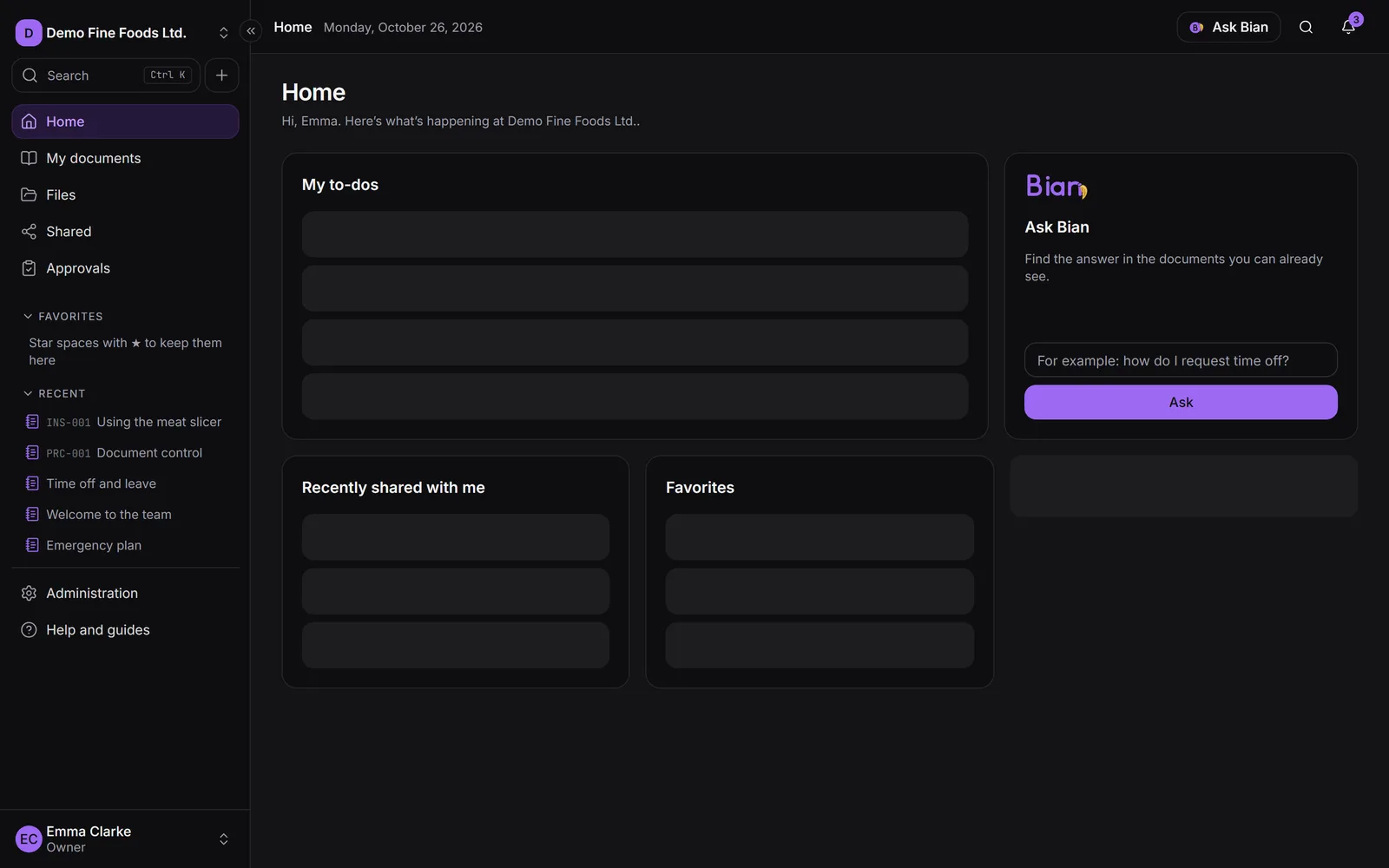
While there’s no content yet, each card shows zero and explains what will appear and what to do to get started.
What the whole team sees
- My to-dos: the approvals and readings assigned to you, with their due date (Due … or Overdue) and the action one click away: Review or Read. If you have many, a link takes you to the full list. See Approvals and Required reading.
- Ask Bian: type a question and click Ask to find the answer in the documents you can already see. See Bian.
- Recently shared with me: the latest items shared with you, and who shared them. See everything shared opens Shared.
- Favorites: the spaces you starred.
- Recent: the last documents you opened.
If you lead a department
Heads and deputies also see three cards about their area:
- Reading compliance in your area: per document, how many people read it, how many don’t have access and how many readings are overdue. Remind those pending notifies them again (once a day).
- Upcoming reviews (60 days): documents in your area that are due for review soon.
- Waiting for approval: what your area sent for review that hasn’t been decided yet.
If you’re the owner or an admin
The company’s key figures appear at the top:
- Current documents: controlled documents with their approved version in use.
- In review: waiting for the approver’s decision.
- Drafts: not yet sent for review.
- Reading compliance: of the readings requested, the share already confirmed.
- Active people (30 days): with some activity in the last month.
- Storage used: how much your company uses and, if there’s a limit, how much is left (see Limits and usage).
Below them are the Activity — last 30 days chart (uploads, publications and confirmed readings per day) and Most viewed this month, the documents opened by the most people. Content in confidential spaces you can’t enter doesn’t count.
If you have a reader seat
People with a reader seat don’t see Home: they go straight to My documents, with their readings and what’s new in their area.
Confirming your email
If you haven’t confirmed your email yet, you’ll see a notice with the Resend email button. Until you confirm it, you can’t invite your team or publish documents.
The side menu and the top bar
- The side menu has Home, My documents, Files and Shared; Approvals if you can approve documents; and the Management group with whatever you can administer. Anything you can’t use doesn’t appear.
- The Create menu offers New page, Upload files and New space, depending on your permissions.
- At the top you’ll find Search (also Ctrl+K, see Search), Ask Bian and Notifications (the bell), with items shared with you, requested readings and approvals.
- On a phone, open the menu with the menu button at the top left. On large screens you can collapse it to show only the icons.